
Shop
Freshman
Leap Year Program
If the user incorrectly enters one of those values, they’re prompted to re-enter the information until it is correct. The user can do this for as many events as they need to enter. The main point of this program is to enter dates and create a planner to show what the events are and what days they are on. The function below checks if the number of the day entered by the user is valid, depending on the month, but the year is more specific to check if it could be a leap year.
I chose this function from my code because of the complexity of the program. I wrote a function that would take in the data of an event date and input it into the personal organizer. This function is made to check if the number of days entered by the user is correct and won’t throw an error. In this function, it starts by resetting the maximum number of days to 0, so there is no possibility for error.
After this, the if statements will check which month of the year it is and save the number of days depending on the month. The if statements will also add more days to the maxdays if it’s February and a leap year. At the end of the function, it will check if the number of days entered is less than 1 or greater than the maxdays for the month. If so, it will throw an error telling the user the two numbers that the days need to be between.
def validateDay(month, day, year):
maxDays = 0
if (month==4) or (month==6) or (month==9) or (month==11):
maxDays = 30
elif (month == 2):
maxDays = 28 + leap_year(year)
else:
maxDays =31
while (day < 1) or (day > maxDays):
day = int(input(“Invalid day. Please enter value from 1-” + str(maxDays)+ “: “))
return day
Restaurant Website
This website was a large project for my freshman year computer science class. The objective that we were given is to create an example restaurant website. As for rules, we could customize our websites however we pleased, though there were some requirements, such as the different varieties of food types (appetizers, main courses, and desserts); although there were restrictions, we had control of what food options we could enter for each category.
The purpose of this website was to portray an example of what a restaurant website would look like if we made one with the small amount of knowledge that we had of HTML and CSS. It was also to test if we could apply all of the concepts that we learned. Some of the struggles that I faced with this website were the use of grids and page changing, such as getting the nav bar to work.
Sophomore
Make a Keyboard
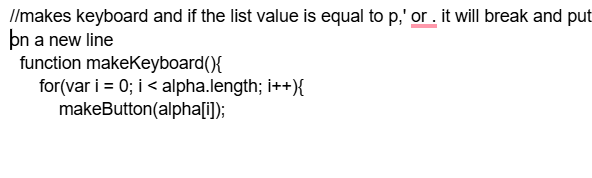
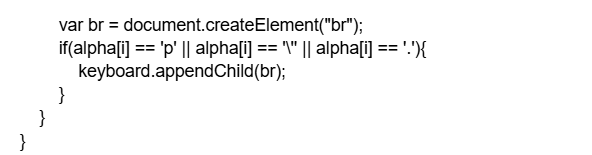
The purpose of this program is to be able to make a keyboard on a website that has clickable letters and basic symbols like semicolon, colon, quotes, etc, and will print out whatever the text of the button. This was made with JavaScript on a website.
The function makeKeyboard() will get a div on a website and will make a keyboard in a box on the screen that is clickable, and when the buttons on the keyboard are clicked, it will print the letter or symbol of the button that is clicked into the box below it.
Guessing Game
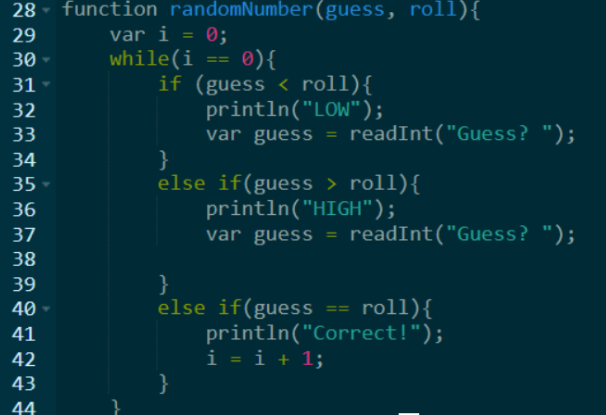
The purpose of this program is to be a game where the user can guess a number, and the computer will tell them if the number that they guessed is too high or too low than the randomly selected number, and then the user will keep guessing until they get the correct answer. It was also created for us to use <, <=, >, and >= statements within the program, and to show how we would use them in the future.
This program is made by getting a random number and asking the user to guess higher or lower, putting it through if statements to check if the user’s guess is higher or lower. If it is lower, it will print LOW, or if it is too high, it will print HIGH, and if the user gets it correct, then the program will end and display Correct!
For this program, it used many different things, such as if and else if statements, to check if something that is entered is equal to, greater than, or less than the random number. It uses a while loop to continuously loop until the number is guessed, and when it does, it will end the loop and display “Correct!”
Junior
Fantasy Football Roster
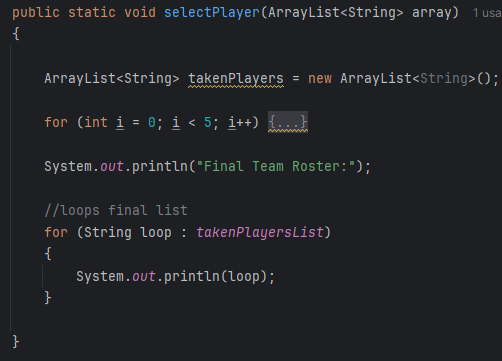
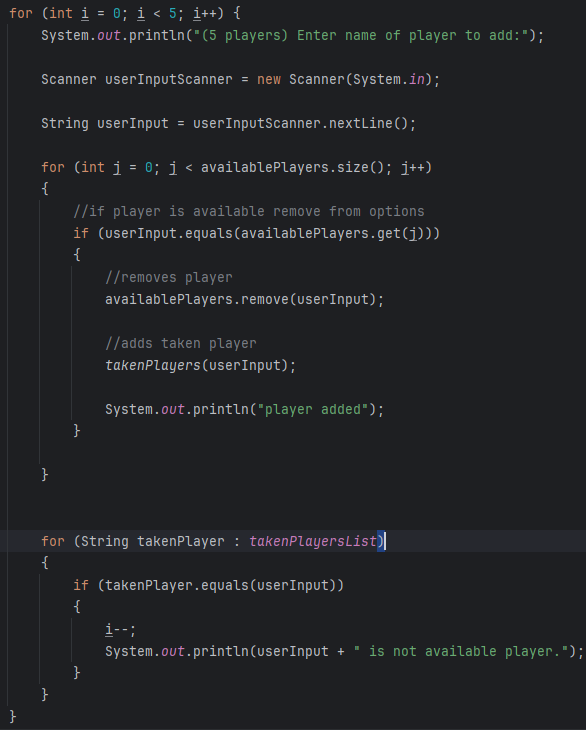
The purpose of this program is to be able to make a roster builder for your fantasy football team, and it will ask the user to input players that they would like to select for their team. Once a player is mentioned, it will be added to the final roster list. And will loop until 5 players are selected, it will end.
The function selectPlayers() will loop, asking the user for players 5 times, and if the player they choose isn’t aviliable it will tell them, and if not, it will be added to a taken players list. This is the main function of the program.
Cougars Den Website
This website is to provide an easier online dining experience for people who desire to make orders. It also makes it much easier for people who are just trying to get more information about the Den. The idea is that having a website can reduce traffic flow in the restaurant and overall increasing quaility of life.
As for requirements, we could customize the website however we pleased, though there were some requirements, such as that the food or anything provided from the restaurant should be shown to provide the customers with an idea of what they’re purchasing. As well as having the same color scheme.
This website is to be able to provide an online service version of the Cougars’ Den to make it more accessible to people for ordering food or just trying to get more information about the Den. Other things on the website, besides ordering, include a page where you can view the instructors for the Cougars Den Restaurant. And both a shop page where you can view the school’s merchandise and an info page that provides more details and hours of operation.
Senior
Loggin & Register
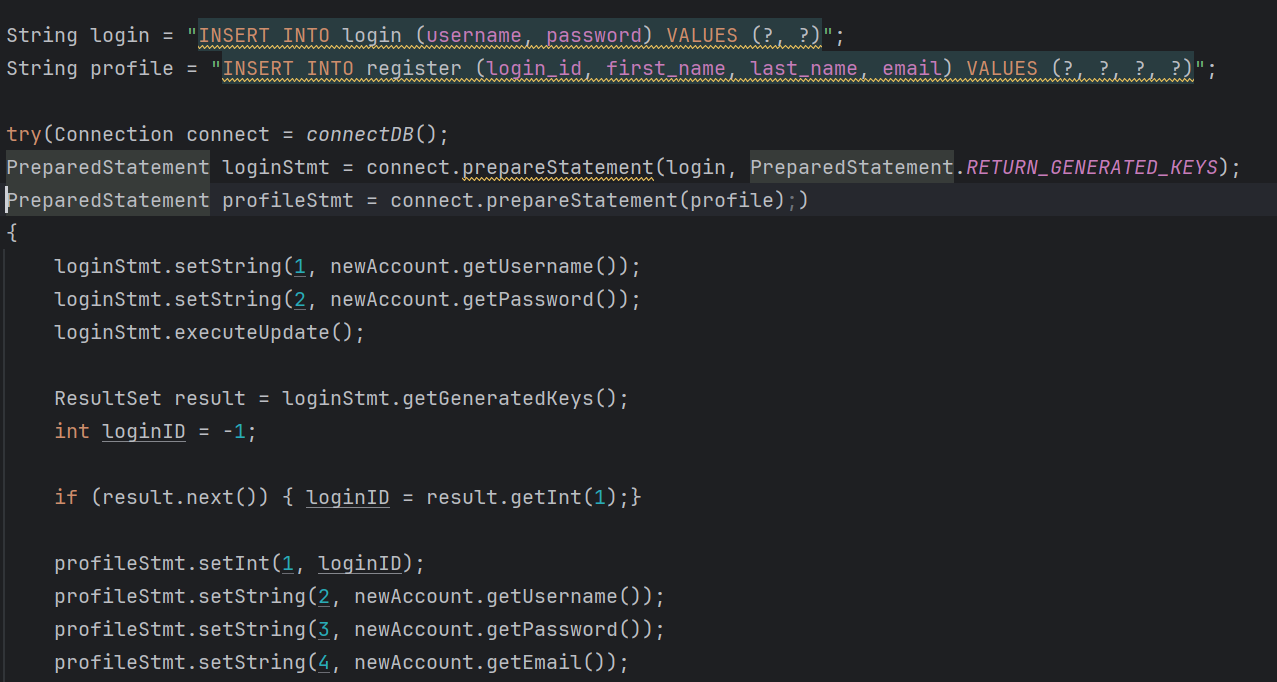
The purpose of the program is to create a section of an app for the register/login part of any application, where a user can make an account, and the data will all be saved into a database. The data from the database can then be accessed by the user once their account is logged in.
The function register() will determine the account that has been selected if the user is signing in, and if the user is creating a new one instead, the function will make a new one with the information provided.
Paw Shop Website
This website was a large class project for my Senior year computer science class. The objective that we were given is to create an online webstore website for the business department at Old Colony. As for the website requirements, we could customize it however we thought fit to the store’s needs, though there were some requirements, such as keeping the same color from our school’s theme and making it functional and presentable for real customers who will use our services. Not only that, but to have it prepared as if the paw shop would use this online store.
The reason for the creation of this website is to demonstrate how, as a shop and a team, we can come together to make a product that would be able to produce results in the real world. This product shows the capabilities of what we can achieve with the knowledge accessed through my shop. Not only this, but the website represents OC as a school, well displaying it as a business and taking things seriously, due to the more widespread internet availability.